Gate and door lock management via Yandex Alice
Did you know that the gate can also be controlled using our AlphaSE system with Yandex Alice?
The meaning is initially not entirely obvious, but in fact it can be very convenient in some cases. If the yard of your house is serviced by gardeners, then surely they do not come so infrequently during the warmer months. For example, in Rostov-on-Don, lawn mowing and plant pruning have to be done 2-3 times a week. It's not very wise to stay at home and wait for the gardeners to arrive every time. In this case, the opportunity to open the gate while in another part of the city will save a lot of time.
A similar situation may occur with Yandex delivery companies, Delivery companies, and engineers involved in the maintenance of irrigation systems or swimming pools.
Let's consider ways to remotely open a gate or entrance gate using Yandex Alice.
The door lock will be controlled both from the intercom monitor and via Yandex. Just click the button in the Yandex Smart Home app or say the phrase: "Alice, open the gate." The connection diagram should be as follows:

Connection diagram of the gate lock
Due to the distance of the lock from the power supply, we recommend using a copper two-core cable with a cross section of 1mm2 for connection. Otherwise, after a couple of years of operation, the lock may stop opening. In addition, we recommend using the lock control unit (BUZ), it will allow you to get rid of the power supply and 1 cable.
Setting
Next, you need to configure the site alice.smart-elec.ru . In our case, the lock is connected to the first output of the SE 6i5o Light module. Note that the output is used to control the electromechanical lock.
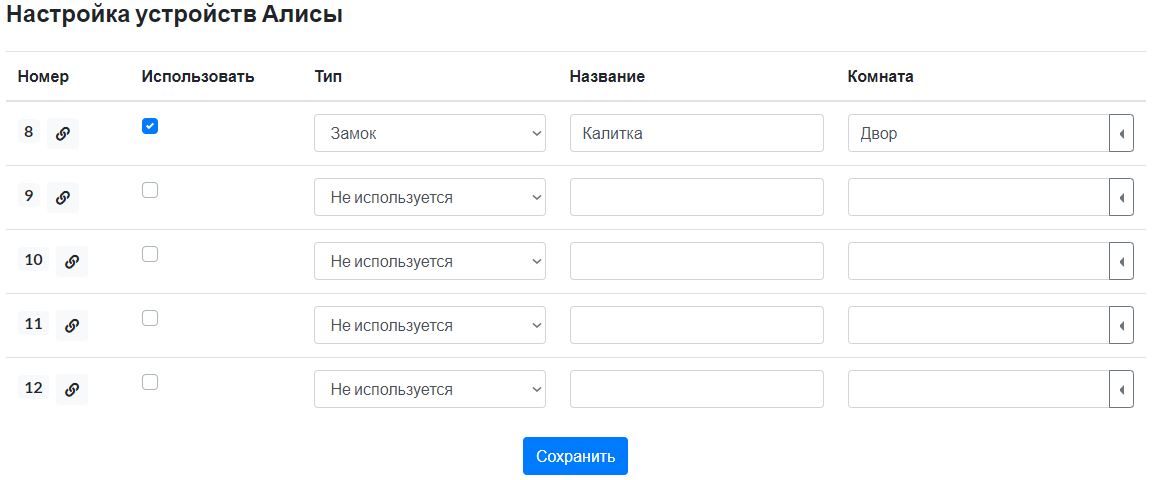 It is also necessary to configure the auto-off of the module relay after switching on. To do this, set the relay auto-off value to 2 seconds in the module settings. In our case, the lock is connected to the Point8 relay.
Gate management
There are 2 connection schemes for controlling the drives. They depend on the type of controller used.
For example, the Came ZF1N has only one input for connecting the control button. By default, it works in step-by-step mode, i.e. each time the button is briefly closed, the Open, Stop, and Close commands will be executed sequentially. If the relay output of the SE 6i5o Light module is connected to the input of the gate controller, it turns out that every time the phrase "Alice, open the gate" or "Alice, the gate" is uttered, an opening, stop, or closing will be performed. In this case, you should definitely see the gate, because it is impossible to remotely track which action is being performed. The second option for working with the Came ZF1N controller is to configure its control input only in the opening mode, closing will be performed on a timer. In this case, when saying the phrase: “Alice, open the gate,” they will indeed always open. Please note that when operating in this mode, it is necessary to install photocells to prevent the gate from closing while the car is in the driveway. In both cases, the same connection scheme will be used, and the output of the SE 6i5o Light module must be configured in lock mode, as in the example with the gate.

Connection diagram Came ZF1N
If we consider the DoorHan CV-01 controller, it has 2 inputs for connecting buttons. If the first one is short—circuited, the gate will open, and the second one will close. In this case, using the SE Curtain DIN module, the commands “Alice, open the gate” and “Alice, close the gate” can be executed. The connection diagram will look like this:

DoorHan CV-01 connection diagram
To connect the CV-01 controller to the SE Curtain, it is sufficient to use any signal cable with a cross-section of at least 0.22mm2. Even a 4x0.22 CDP or UTP/FTP4 Outdoor is enough. Due to the fact that the CV-01 module uses a reference voltage of 5 V, it is necessary to maintain a 10 cm offset from the power cables when laying, or to use signal cables with a shield.
Unfortunately, the current version of the DoorHan CV-01 controller has a couple of bugs that can ruin the perfect control picture.
1) If you briefly close the "Open" entrance, the gate begins to open. If you re-close the "Open" entrance during the opening, the gate will stop. A similar situation occurs when the gate is closed. It turns out that if you say, "Alice, open the gate," during the opening of the gate, the gate will stop.
2) If you close the "Close" entrance during the opening of the gate, the gate will also stop. To start closing, you will need to re-close the "Close" output. The situation is similar with the opening.
Both cases are not fatal, but not the most pleasant. Hopefully, the problem will be fixed in future versions.