Implementation of a security alarm system using SE Secu
This article will describe the capabilities, operating principle and connection diagram of the SE Secu alarm module in a 3-room apartment.
The module is designed to work as part of the AlphaSE automation system with Yandex Alice. It can be controlled via the Dom with Alice application or the Smart Electronics management interface. If only the ability to view and control operating modes is available through Alice's application, then the status of sensors in security zones can also be displayed in the interface from Smart Electronics.
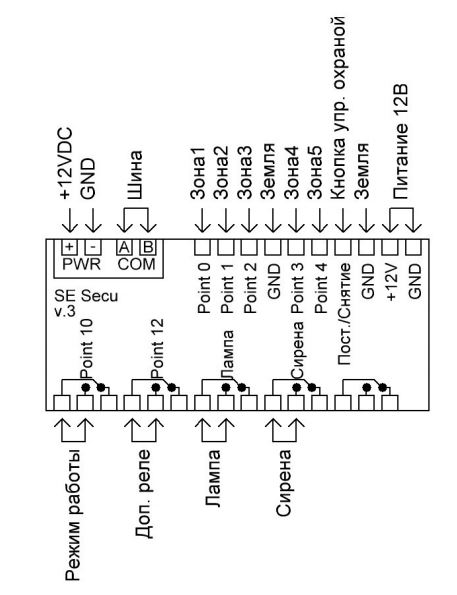
Cхема SE Secu
Operating modes
The module can operate in 3 modes:
1. "There is no one" - all 5 zones are guarded.
2. "Night" - there is only 1 security zone. It is recommended to include only the entrance door opening sensor in it.
3. "Access" the sensors are not monitored.
Setting/removing the "No one is here" mode can be done by briefly closing the "Post./Withdrawal", via the app and voice commands. Setting/removing the "Night" mode can only be done via the app and voice commands. When the "No one" and "Night" modes are turned on, they do not turn on immediately.
To turn on the alarm in the "There is no one" mode, the owner must go out into the hallway, briefly close the "Post./Withdrawal" and leave the apartment. After 30 seconds. (changes in settings) after pressing the button, the alarm will turn on the "No one is here" mode, which will be confirmed by turning on the warning light. The warning light will blink during the setting. If the warning light did not turn on, then the "No one" mode was not turned on. The main reason is that the sensors are triggered during the installation process. After waiting for the lamp to turn on, the owner can leave. If the apartment owner returns home and the apartment is guarded, he must open the door, enter the apartment, close the door behind him and only then turn off the alarm by pressing the "Post./Withdrawal".
Connection

Схема расположения датчиков

Cхема подключения
Sensor selection
Any low-current sensors with a normally closed contact are suitable for connection to the SE Secu module. Almost all sensors for burglar alarms have normally closed contacts. This means that while the sensor does not see movement, its output relay is closed, as soon as movement is detected, the contact opens for 2 seconds. Door opening sensors have similar functionality, the only difference from motion sensors is that the relays remain open the entire time the door is open.


Security detector volumetric optoelectronic Astra-7

Entrance door opening sensor ST-DM125NO-WT
Setting
In order to set and remove modes via Yandex Alice, go to the settings of the SE Secu module in the Web interface and activate the corresponding modes.

To control the burglar alarm through the "House with Alice" application, check the boxes only opposite points 14 and 15, and they must be unchecked opposite points 5-11. This is due to the fact that the Yandex application does not display information about the status of sensors and operating modes. Information about them is correctly displayed only in the Smart Electronics management interface.
Information about setting/removing/alerting a security alarm can be sent to Telegram. To set up the notification, go to the "Notifications" section and make the settings according to the example. The only difference may be the Telegram Token number. You can find out how to get it from the article.

Before installing the alarm system at the facility, be sure to assemble a test circuit on the table, using jumpers instead of motion sensors and opening, debug and configure it. This will allow you to fully understand the principle of operation, avoid many installation errors and significantly reduce the connection time on site.
Conclusion
This article describes the typical connection of the SE Secu module. The full list of functions can be found in the instructions for the module.